Golf Cart Lithium BMS Cutoff: Why Your Cart Suddenly Stops and How to Fix It
CartVoltage is reader-supported. If you buy through links on this page we may earn a commission at no extra cost to you. As an Amazon Associate we earn from qualifying purchases. Details
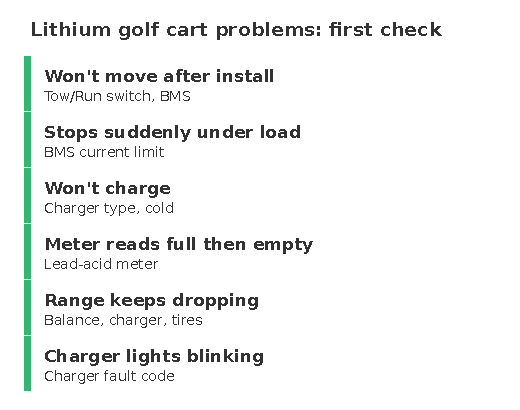
A lead-acid cart dies slowly: it gets sluggish, the lights dim, you limp home. A lithium cart dies instantly. One moment you are halfway up a hill, the next the dash is dark and the cart is rolling backwards, and thirty seconds later everything works again as if nothing happened. That is the battery management system doing its job, and once you know which of its protections tripped, the fix is usually obvious. This guide covers the six BMS cutoffs that happen in golf carts, how to tell them apart from the symptom, how to reset the pack, and how to stop it happening again.
What the BMS Is Protecting Against
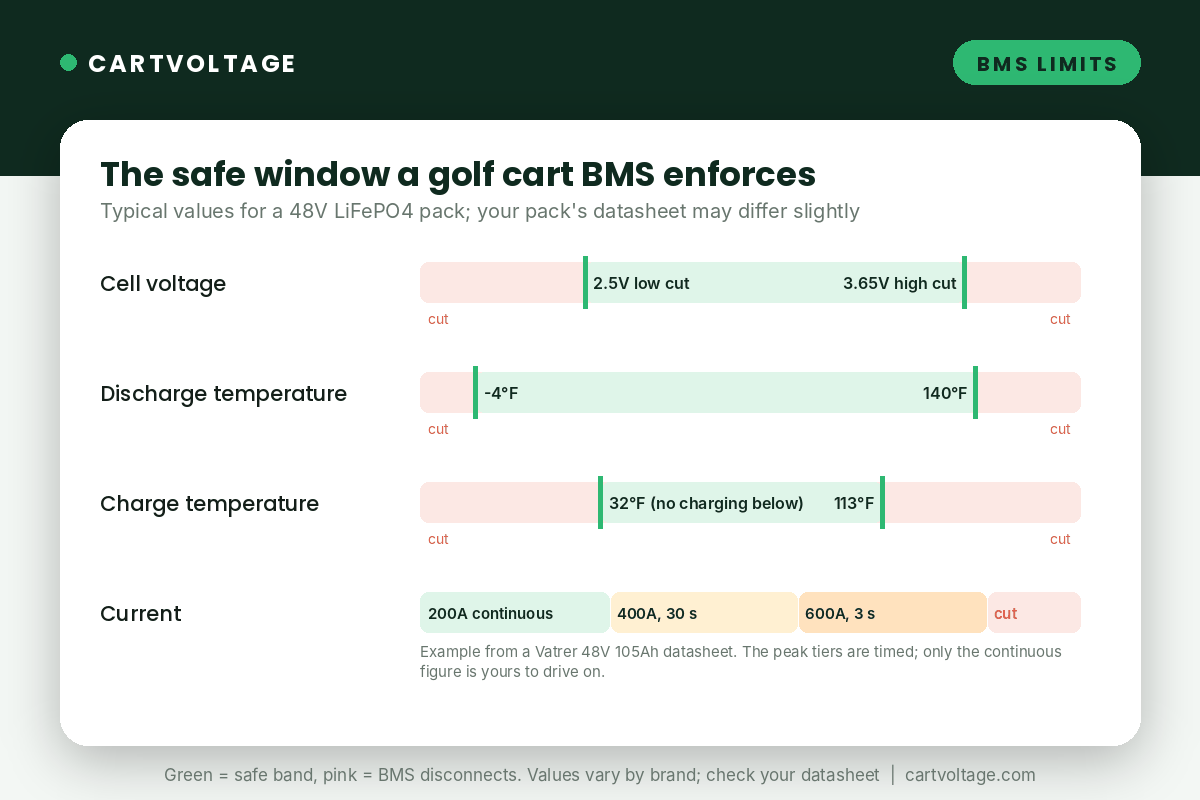
Every LiFePO4 golf cart pack has a BMS between the cells and the terminals. It watches each cell’s voltage, the pack current in both directions and the temperature, and it opens a set of transistor switches the instant any of them leaves the safe window. The window is roughly the same on every brand: cells between 2.5V and 3.65V, discharge below about 140°F, charge between 32°F and about 113°F, and a current limit with two tiers, a continuous figure the pack can carry indefinitely and a short peak it tolerates for seconds. When the BMS opens the switches, the pack voltage at the terminals drops to zero. The controller sees nothing, the cart stops, and there is no warning because a protection that gave warning would not be protecting anything.
The Six Cutoffs, and How to Tell Them Apart
1. Over-current: dies on a hill or a hard takeoff, back in under a minute
The most common cutoff on modified carts. A stock 48V cart with a 250A to 300A controller draws 100A to 180A climbing; the 200A continuous BMS on most packs covers that. Lift the cart, fit 23″ tires, add a 400A or 500A controller or a speed code, and the climb pulls 250A to 350A for longer than the BMS’s timed window allows. The pack cuts, the cart rolls, the BMS resets itself after 10 to 60 seconds, and the cart runs again until the next hill. The fix is a pack whose continuous rating covers the cart’s real draw, which is why the hills and lifted carts guide recommends 250A or more for any modified cart, or two packs in parallel so each carries half (how to do that). Lowering the controller’s current limit works too, at the cost of the performance you paid for. The Engineer’s Note on continuous vs peak current explains why the 1000A peak on the listing does not help here.
2. Cell low voltage: dies at 20 to 40% on the meter, back after a rest
The BMS cuts when any single cell drops to about 2.5V, not when the pack as a whole is empty. Under a heavy load every cell sags, and a cell that is a little weaker or a little lower than the rest sags past the limit while the pack still shows 30% in the app (and why the meter can’t be trusted there). The cart dies on a hill, sits for a minute, the cell voltage recovers, and the cart drives home on the flat with no complaint. The tell is in the app: look at the lowest cell during a climb, and look at the spread between cells after a full charge and an hour at rest. A spread over 0.1V means the pack needs balancing (several full charges with an extra hour or two on the charger), and a cell that stays low after that is a warranty claim. Running the pack habitually below 20% makes this cutoff far more likely, because the LiFePO4 voltage curve falls off a cliff at the bottom. The losing range guide covers imbalance in more depth.
3. Over-temperature: dies on a hot afternoon after a long run
Most BMSs stop discharge somewhere between 140°F and 150°F at the cell sensor. A pack does not get there from the weather alone; it gets there from the weather plus heavy current plus a battery compartment with no airflow. A six-seater in Phoenix in July, climbing, with the pack sealed under the seat, can trip it. The cutoff lasts until the pack cools, which can be twenty minutes. The fix is airflow and load: leave the tray ventilated, park in shade, and on the hottest days accept that a 200A BMS working at its limit is also a heater. Charging is blocked above about 113°F too, which is why a pack that has just come in hot from a long drive sometimes will not start charging for half an hour.
4. Regen over-voltage: dies going downhill right after a full charge
Carts with regenerative braking (every EZGO RXV, Club Car Precedent and Onward, and most AC-drive carts) push current back into the pack on descents. A pack at 100% has nowhere to put it: the cells are already at 3.65V, the BMS sees over-voltage, and it opens the charge switches. On some packs that disconnects the whole pack and the cart loses drive and regen at once, which on a steep hill is a frightening thirty seconds. The pattern is unmistakable: it only happens on a descent within the first mile or two after charging to full. The fix is to not charge to 100% if the first thing the cart will do is go downhill, which on a hilltop garage means stopping the charge at 90% or driving on the flat first. Packs sold as “regen-tolerant” or with a separate charge path handle it better; the RXV conversion guide covers this for the cart it affects most.
5. Short-circuit trip on installation: a spark, then a dead pack
A golf cart controller has large capacitors inside. Connect a charged lithium pack to them directly and the capacitors charge in a fraction of a second, drawing a current spike that looks exactly like a short circuit to the BMS. You see a spark at the terminal, and the pack is dead: the BMS has latched its short-circuit protection. Some packs reset after a minute off, some need the charger connected for thirty seconds, some need the pack’s button held. The prevention is a pre-charge: touch a resistor (a 48V light bulb or a 100-ohm 10W resistor) across the last connection for a few seconds before making it, so the capacitors fill slowly. This is step 8 of the conversion guide and the most skipped one.
6. BMS sleep: dead after sitting, wakes with the charger
Not a fault, but it gets reported as one every week. To protect itself from draining the pack during storage, the BMS on many packs goes to sleep after a period with no current, anywhere from a day to a week depending on the brand. The cart is completely dead: no dash, no click, no app. Connecting the charger for a few seconds, pressing the pack’s power button, or on some packs just a key cycle wakes it. If the cart sat for months rather than days and nothing wakes it, the pack may have drained below the BMS’s own cutoff, which is a different problem covered in the won’t-charge guide; the winter storage guide explains how to avoid it. A sleeping BMS is also why a charger shows green on an empty pack: charger light patterns.
Symptom to Cutoff, at a Glance
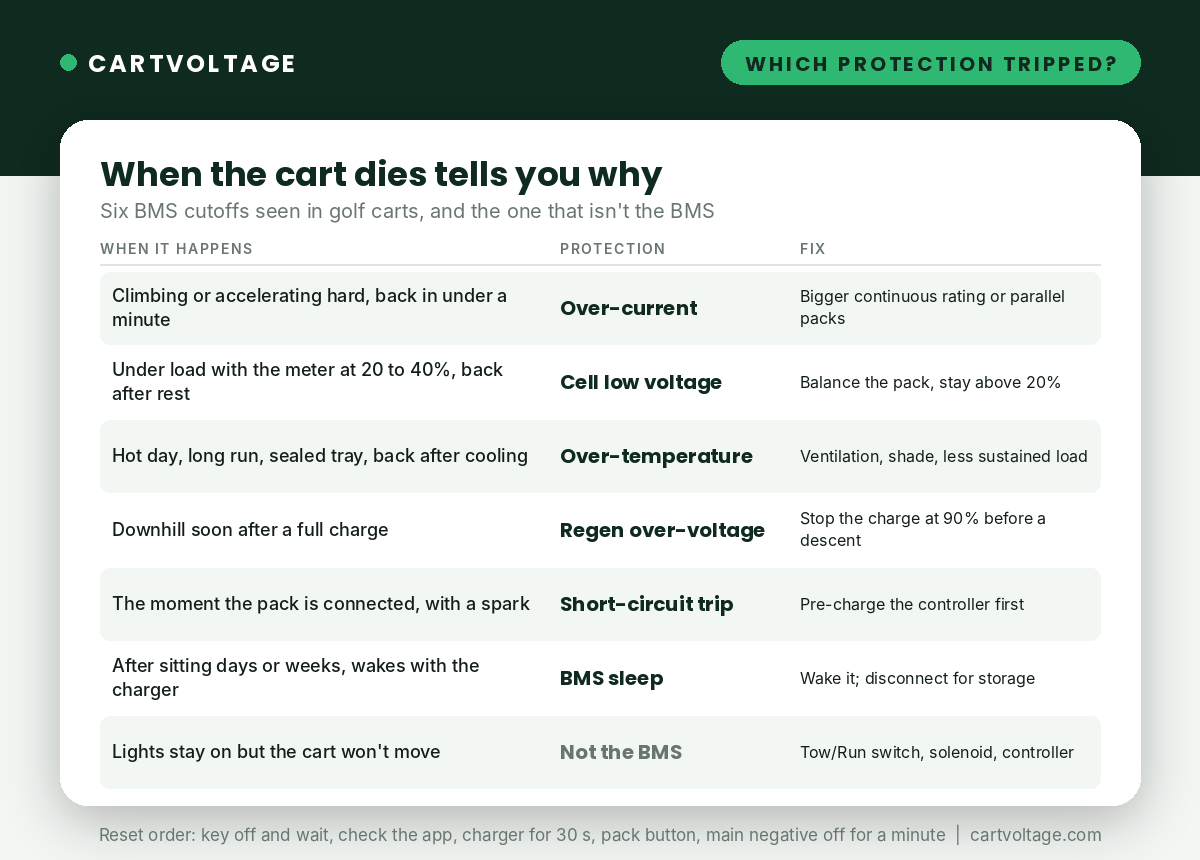
| When the cart dies | Comes back | Protection | Fix |
|---|---|---|---|
| Climbing or accelerating hard | 10 to 60 seconds | Over-current | Pack with higher continuous rating, parallel packs, or lower controller limit |
| Under load with the meter at 20 to 40% | After a minute of rest | Cell low voltage | Balance the pack; keep it above 20%; replace a cell that stays low |
| Hot day, long run, enclosed tray | After it cools, up to 20 minutes | Over-temperature | Ventilation, shade, less sustained load |
| Downhill soon after a full charge | Seconds to a minute | Regen over-voltage | Stop charging at 90% before a descent; regen-tolerant pack |
| The moment the pack is connected, with a spark | After reset or charger | Short-circuit | Pre-charge the controller before the last connection |
| After sitting days or weeks | When the charger is connected | Sleep mode | Wake it; disconnect for long storage |
| Dash lights stay on, cart won’t move | n/a | Not the BMS | Tow/Run switch, solenoid, controller: see the won’t-move guide |
How to Reset a Tripped BMS
- Key off, foot off the pedal, wait one minute. Over-current and low-voltage trips clear themselves once the load is gone and the cells recover.
- Check the app. It will usually name the protection that tripped and show the cell voltages and temperature; this is the single most useful minute you can spend.
- Connect the charger for 30 seconds. Charge current wakes a sleeping BMS and resets most latched protections, including the short-circuit trip.
- Press the pack’s power button if it has one, off and on.
- Disconnect the main negative for a minute and reconnect with a pre-charge if the controller is still attached.
- If it trips again within the same drive, stop driving it. Repeated trips on the same hill mean the pack is wrong for the cart, and a BMS that trips several times an hour is being asked to do a job its transistors will eventually fail at.
Stopping It Happening Again
- Match the continuous rating to the cart, not the peak. Stock cart: 200A is fine. Lifted, big tires, 400A controller, towing, six seats on hills: 250A to 300A, or two packs in parallel. The 48V comparison lists each pack’s continuous figure.
- Keep the cells balanced. A full charge with an extra hour on the charger every two to four weeks is enough for most packs; check the spread in the app monthly.
- Stay above 20% on hilly routes. The bottom of the LiFePO4 curve is where low-voltage trips live.
- Don’t charge to 100% before a descent on a regen cart, or buy a pack that handles regen at full.
- Pre-charge on every reconnection. Once at install, and again any time the pack has been disconnected.
- Give the pack air. A sealed tray on a hot cart is the over-temperature trip waiting to happen.
Frequently Asked Questions
Why does my lithium golf cart cut out going uphill and then work again?
Over-current protection. The climb pulls more than the BMS’s continuous rating for longer than its timed peak allows, the BMS disconnects, and it reconnects once the load is gone. The pack is undersized for the cart’s draw; a 250A or higher continuous rating, or two packs in parallel, is the fix.
Does a BMS cutoff damage the battery?
An occasional trip does not; that is what the protection is for. Repeated over-current trips mean the BMS transistors are running hot between trips, and repeated low-voltage trips mean cells are being pulled to their limit, and both shorten the pack’s life. Treat frequent cutoffs as a sizing or balance problem to fix, not a quirk to live with.
Can I bypass the BMS?
No. Without it nothing stops a cell from being over-charged, over-discharged or short-circuited, and LiFePO4’s good safety record depends on the BMS being there. A pack that trips constantly needs a bigger BMS, not no BMS.
Why is my cart dead after sitting for a week?
Most likely the BMS went to sleep to protect the pack. Connect the charger for a few seconds or press the pack’s button. If that doesn’t wake it, the pack has drained past its cutoff and the won’t-charge guide applies.
Is the cutoff the BMS or the controller?
If the dash and lights die with the cart, the BMS disconnected the pack. If the lights stay on and the cart just won’t move, the pack is fine and the controller, solenoid or Tow/Run switch is the place to look; that list is in golf cart won’t move after lithium conversion.
Next Steps
If the pack is cutting out on hills, the hills and lifted carts guide lists the packs with 250A and 300A continuous ratings. If it cuts out at low charge, start with the balance check in the losing range guide. And if it is not the BMS at all, the won’t-move guide covers the rest of the cart. Every other symptom is in common lithium golf cart battery problems.