Golf Cart Charger Blinking Red or Green? Lithium Charger Lights and Error Codes Explained
CartVoltage is reader-supported. If you buy through links on this page we may earn a commission at no extra cost to you. As an Amazon Associate we earn from qualifying purchases. Details
Golf cart chargers talk in lights, and every maker uses a slightly different dialect. A flashing red LED means “no battery detected” on one charger and “charging” on another; a steady green can mean full or can mean the charger found nothing to charge. On a lithium cart the stakes are higher, because the most common fault behind the blinking is the BMS having disconnected the pack, which a lead-acid owner has never seen. This guide reads the lights by behaviour first, so you can diagnose any charger, then lists the exact codes for the chargers most lithium carts use.
Read the Lights by Behaviour, Not by Colour
Because colours vary by brand, the reliable way to read a charger is to note three things: what the light did in the first ten seconds after you plugged in, whether the charger’s fan ran, and what the pack’s app or voltage did over the next few minutes. Those three observations map to the causes below on almost any charger.

| What you see | What it usually means on a lithium cart | Do this |
|---|---|---|
| Green (or “complete”) within seconds of plugging in, pack not full | The charger sees no load. Either the BMS has disconnected the pack after a low-voltage or protection trip, or the pack’s power switch is off | Switch the pack on; connect the charger for 30 seconds to wake the BMS; check the app for a protection flag |
| Flashing red, no fan | No battery detected, or battery voltage too low or too high for the charger | Check the plug and receptacle; read pack voltage; confirm a 48V charger is on a 48V pack |
| Red and green alternating, or red flashing in groups | A counted fault code: temperature, polarity, timeout or internal | Count the flashes and use the maker’s table below; unplug AC for 30 seconds to reset |
| No lights at all | No AC power, a blown fuse in the charger or the cart, or a dead receptacle | Try another outlet; check the charger’s fuse; on carts with an onboard charger check the cart’s fuse |
| Red (charging) for hours, pack never reaches 100% in the app | Charger terminating below 58.4V, or the BMS blocking charge (below 32°F, or one cell at its high limit) | Read voltage at the end of the charge; warm the pack above 41°F; check cell spread in the app |
| Red, then green, then red again every few minutes | The BMS is tripping on over-voltage at the top of the charge and resetting: usually a lead-acid charger on a lithium pack, or a badly imbalanced pack | Confirm the charger has a LiFePO4 profile; balance the pack with several full charges |
| Fan runs, light shows charging, dash meter doesn’t move | Normal on lithium: the factory meter can’t read the flat curve | Trust the app, not the dash; see the meter guide |
The Lithium-Specific Cause Behind Most of Them: a Sleeping or Tripped BMS
A lead-acid pack is always “there”: connect a charger and it sees 40-odd volts and starts. A lithium pack is only there when its BMS says so. After a low-voltage cutoff, after weeks of sitting, after a short-circuit trip on installation or a cold morning below freezing, the BMS opens its switches and the charger sees an open circuit. Different chargers react differently to that: some show green and sit, some flash red for “no battery”, some count a fault. Dedicated lithium chargers send a small wake-up pulse first, which is why a charger built for the pack rarely shows this fault and a lead-acid charger often does. If the lights make no sense, assume the BMS first: switch the pack off and on, press its button, connect the charger for thirty seconds, and look at the app. The BMS cutoff guide covers each trip and its reset, and the won’t-charge guide runs the full list of causes in order. A pack that sat all winter is the classic case; the winter storage guide explains how to avoid it next year.
Delta-Q QuiQ: the Flash Codes, Verified
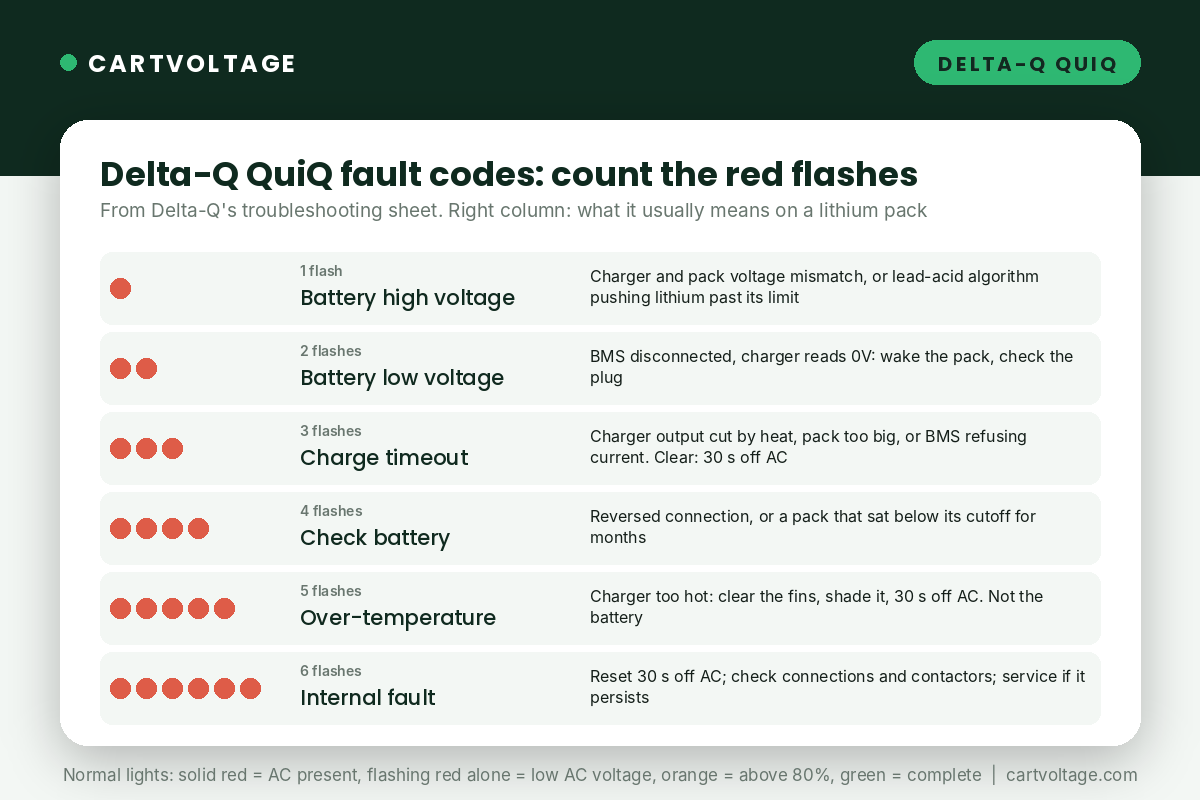
The Delta-Q QuiQ is the onboard charger on 2008 to 2013 EZGO RXV carts and many Tomberlin, Columbia and import carts, and it is the charger whose codes people most often search for. It reports faults as a counted red flash between pauses. These are from Delta-Q’s own troubleshooting sheet.
| Red flashes | Fault | Delta-Q’s stated cause | Action, and what it means with lithium |
|---|---|---|---|
| 1 | Battery high voltage | Starting voltage above 2.5V per cell, or voltage during charge above 2.7V per cell (lead-acid cell count) | Charger and pack voltage mismatch, or a lead-acid algorithm trying to push a lithium pack past its limit. Clears automatically when voltage falls into range; the fix is a lithium algorithm or a lithium charger |
| 2 | Battery low voltage | Starting voltage below 0.5V per cell | On lithium this is nearly always a disconnected BMS reading 0V. Wake the pack; check the plug |
| 3 | Charge timeout | Battery failed to charge within the time the algorithm allows | Charger output reduced by heat, a very large pack on a small charger, or the BMS refusing current. Must be cleared by unplugging AC for 30 seconds |
| 4 | Check battery | Pack could not be trickle charged to the minimum level for a normal charge | Reversed connection, or a pack that has sat below its cutoff for months. Check polarity, then follow the won’t-charge guide’s recovery steps |
| 5 | Over-temperature | Charger too hot during operation and shut down | Clear the cooling fins, move it out of the sun, reset with 30 seconds off AC. Not a battery problem |
| 6 | Internal fault | Batteries won’t accept charge current, or an internal charger fault | Reset with 30 seconds off AC; check for high-resistance connections and bad contactors; if it persists the charger needs service |
Normal QuiQ lights: solid red means AC is present; flashing red on its own means the AC voltage is low, usually a long or thin extension cord; orange means the pack is above 80%; green means complete. A QuiQ on a lithium conversion needs a LiFePO4 algorithm loaded, which Delta-Q supplies for several packs; without it the charger will run a lead-acid profile and throw code 1 at the top of every charge, which is the subject of can you use a lead-acid charger on lithium.
Lester Summit II
The Summit II is the replacement charger most dealers fit, and it supports a lithium battery type. It has four LEDs: blue for AC present, yellow for charge status, green for charge complete and red for fault, and the red LED reports a counted blink code the same way the QuiQ does. The code chart is in the manual and in Lester’s phone app, which also shows the fault in plain words, so the quickest diagnosis on a Summit II is to open the app. The faults that matter on lithium are the same three as everywhere else: battery voltage out of range for the selected profile, a charge timeout, and over-temperature. A Summit II that was moved from a lead-acid cart to a lithium one must have its battery type changed; left on the old profile it will fault at the end of every charge.
Dedicated Lithium Chargers: FORM, KAISAL, LiTime and the Kit Chargers
The chargers bundled with lithium packs, and the aftermarket lithium chargers sold by plug type, almost all use a two-colour scheme: red while charging, green when complete or when no battery is connected, and a fault shown by flashing red, by red and green together, or by the light going out. Their manuals are short, so the behaviour table at the top of this page is the practical guide. Three things specific to these chargers:
- Green on connection, pack not full: the charger is not seeing the pack. BMS off, pack switch off, or plug not seated. Nearly every “my new charger doesn’t work” report is this.
- Red then green in under an hour on a pack that was at 40%: the charger terminated early. Read the voltage: if it is under 58V on a 48V pack, the charger is faulty or set to the wrong voltage. If it is at 58.4V, one cell reached its limit first and the BMS stopped the charge: an imbalance, fixed by several full charges with an extra hour on the charger.
- Light out, fan off, after a cold night: the better lithium chargers refuse to charge below 32°F, some by simply not starting. Bring the pack above 41°F and try again; the cold weather guide explains why this is the charger doing you a favour.
The chargers we recommend by cart and plug are in best lithium golf cart chargers; the plug types guide covers the connector, which is itself the cause of a surprising share of flashing lights.
A Reset Routine That Clears Most Faults
- Unplug the charger from the wall and from the cart. Wait 30 seconds; most chargers only clear a latched fault when AC is removed.
- Look at the plug and receptacle: bent pins, green corrosion, a pin pushed back into the housing. Wiggle-test the receptacle on the cart.
- Check the pack: switch on, app connected, no protection flag, voltage above 40V on a 48V pack. If the app won’t connect, the BMS is asleep or tripped; wake it.
- Plug the charger into the cart first, then into the wall, and watch the first ten seconds.
- If a counted code repeats, note the count and the pack temperature and voltage before calling anyone; that is what the charger maker will ask for.
Frequently Asked Questions
Why is my golf cart charger blinking red, or red and green?
On most chargers a flashing red light is a fault, most often “no battery detected” or “battery voltage out of range”. On a lithium cart that usually means the BMS has disconnected the pack; wake it with the pack’s switch or by leaving the charger connected for thirty seconds. If the flashing comes in counted groups, it is a specific code; the Delta-Q table above covers the most common charger.
Why is my charger green but the battery isn’t charged?
The charger sees no load and assumes the job is done. The pack’s BMS is off or tripped, the pack’s switch is off, or the plug isn’t making contact. Fix the connection and the charger will go red. Once it is charging, here is how long it takes to charge a golf cart.
What does a Delta-Q charger flashing 2 times mean?
Battery low voltage: the charger read less than 0.5V per cell at the start. On lithium it almost always means the BMS has the pack disconnected and the charger is seeing zero volts. Check the pack with a multimeter and compare the reading with the golf cart battery voltage chart.
Can a blinking charger damage a lithium battery?
Not by blinking. The risk is the fault behind it: a lead-acid charger repeatedly pushing the pack to its over-voltage trip, or a charger forcing current into a cold pack if its cold cutoff is missing. Both are reasons to use a charger with a LiFePO4 profile.
Why does the charger work on one cart but not another?
Different pack, different BMS behaviour. A pack that has drained below its cutoff shows 0V and some chargers will not start into it; a dedicated lithium charger applies a wake-up pulse and will. Check the pack voltage before blaming the charger.
Next Steps
If the lights point at the pack, the won’t-charge guide takes it from here in order. If they point at the charger, the charger guide lists the replacements by plug, and charger compatibility explains the profile the new one must have.