
Golf Cart Battery Meter Reads Wrong After a Lithium Swap? Why, and the Fix
CartVoltage is reader-supported. If you buy through links on this page we may earn a commission at no extra cost to you. As an Amazon Associate we earn from qualifying purchases. Details
The first drive after a lithium conversion goes like this: the dash meter shows full. It shows full an hour later. It shows full at the far end of the neighborhood, then drops to empty in the space of a quarter mile and the cart stops. Nothing is wrong with the battery. The factory meter is a voltmeter with a lead-acid scale painted on it, and a lithium pack’s voltage does not move the way the scale expects. This guide explains exactly why, gives you the voltage-to-charge table for lithium so you can read a plain voltmeter correctly, and covers the three ways to get an honest fuel gauge back.
Why a Lead-Acid Meter Can’t Read Lithium
A flooded lead-acid pack’s voltage slides down steadily as it discharges: a 48V set rests at about 50.9V full, 48.4V at half, and 46.6V with 20% left. That slope is what every factory meter, from the analog needle on an older Club Car to the ten-LED bar on an EZGO, is built to read. A LiFePO4 pack has almost no slope. Sixteen cells rest at about 54.4V full, 52.2V at half, and 51.2V with 20% left: about three volts across eighty percent of the capacity, and barely one volt between 70% and 30%. Below 10% the voltage falls off a cliff to 44V or less and the BMS cuts at 40V (what that cutoff looks like from the driver’s seat). Put that curve on a lead-acid scale and the meter reads “full” from 100% down to about 15%, then drops through “half” and “empty” in minutes. The meter is not broken; it is answering a question that no longer has the same answer.

Voltage to State of Charge for Lithium Golf Cart Batteries
If you have a plain voltmeter, this table turns its reading into a charge level. The figures are resting voltages: cart parked, key off, at least fifteen minutes after driving or charging. Under load the voltage sags one or two volts and the table does not apply.
| State of charge | 48V LiFePO4 (16 cells) | 36V LiFePO4 (12 cells) | 72V LiFePO4 (24 cells) | 48V lead-acid, for comparison |
|---|---|---|---|---|
| 100% (rested after full charge) | 54.4V | 40.8V | 81.6V | 50.9V |
| 90% | 53.6V | 40.2V | 80.4V | 50.5V |
| 70% | 52.8V | 39.6V | 79.2V | 49.5V |
| 50% | 52.2V | 39.1V | 78.2V | 48.4V |
| 30% | 51.5V | 38.6V | 77.3V | 47.2V |
| 20% | 51.2V | 38.4V | 76.8V | 46.6V |
| 10% | 48.0V | 36.0V | 72.0V | 46.0V |
| BMS cutoff (0%) | 40 to 44V | 30 to 33V | 60 to 66V | n/a |
Typical LiFePO4 resting values; individual packs vary by a few tenths of a volt per cell. The usable signal is in the last 20%: a rested 48V pack under about 51.2V is low, under 50V is nearly empty. The 72V column assumes a 24-cell (76.8V nominal) pack; some 72V packs use fewer cells and read lower, so check the label (the 72V guide explains the difference). Every step from 100% to 10%, plus single 6V, 8V and 12V batteries, is in the full golf cart battery voltage chart.
Three Ways to Get an Honest Gauge
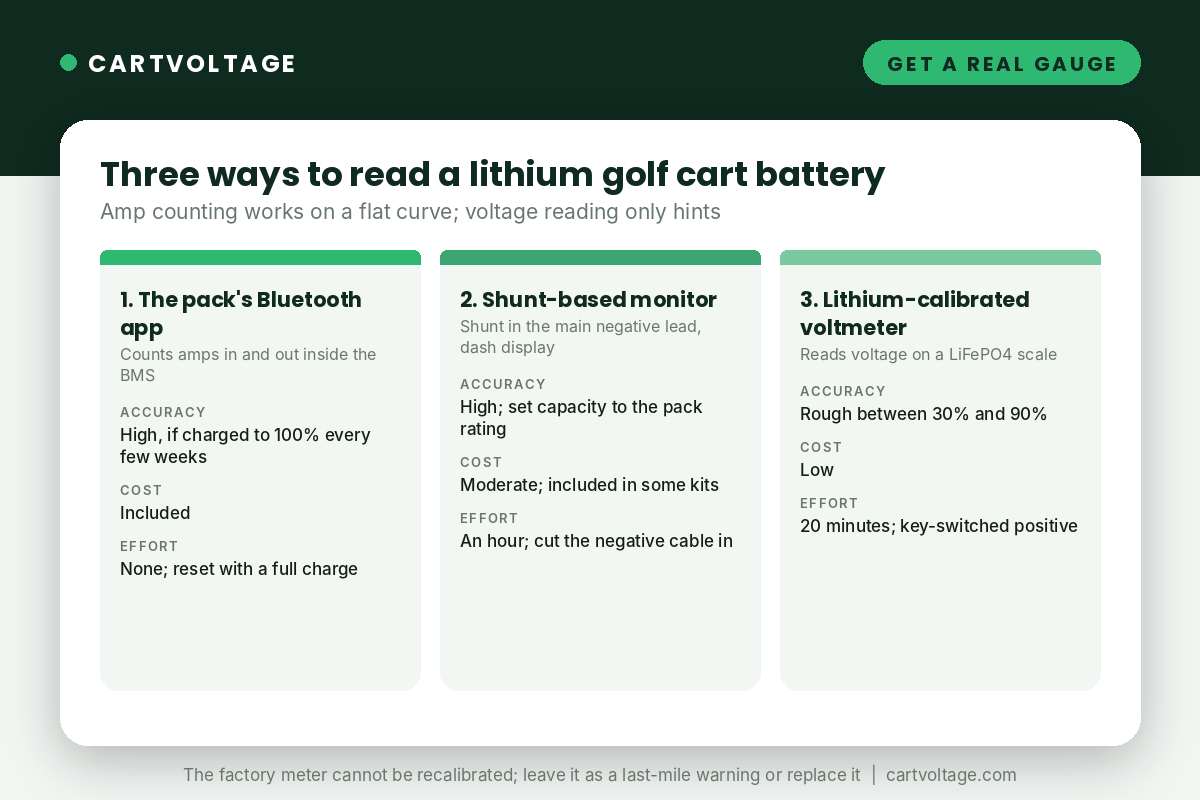
1. The pack’s Bluetooth app (best, if the pack has one)
Most packs sold today, including every one in the 48V comparison, have a BMS with Bluetooth. The app does not read voltage; it counts the amps flowing in and out and keeps a running percentage, which is the only method that works on a flat curve. Its one weakness is drift: the count resets to 100% only when the pack reaches full charge, so a cart charged to 80% for a month shows a percentage that is slowly wrong. Charge to 100% and leave it on the charger an extra hour every couple of weeks and the app stays honest. The losing range guide explains how far it can drift and how to tell.
2. A shunt-based monitor (best for packs without an app)
A shunt is a precision resistor that goes in the pack’s main negative lead; a monitor reads the tiny voltage across it and counts amps exactly as the BMS app does, then shows a percentage, amps, volts and time remaining on a small dash display. Several kits include one, which is what the “touch monitor” in the DC HOUSE, LOSSIGY and OGRPHY kits is (compared in best lithium conversion kits). Fitted separately it costs a little more than a voltmeter and takes an hour, because the negative cable has to be cut or re-routed through the shunt. Set the monitor’s capacity to the pack’s rating and it needs the same occasional full charge to reset. We compare the shunt monitors that suit 36V, 48V and 72V carts in best lithium battery meters for golf carts.
3. A lithium-calibrated voltmeter (cheapest, roughest)
A small digital meter with a LiFePO4 preset for 36V, 48V or 72V reads the pack voltage and maps it to the lithium curve rather than the lead-acid one. It fits the factory meter’s hole on many carts, costs very little and wires to a key-switched positive and a negative in twenty minutes. Because the curve is flat it is only approximate between 30% and 90%, and it reads low under load and high just after charging. It is good at the two things that matter most, showing full after a charge and showing low before the BMS cuts out, which is why we list a lithium-calibrated meter in the accessories for owners whose packs have no app. Wire it through the key switch so it does not draw from the pack while parked.
What to Do With the Factory Meter
- Analog needle or LED bar meters (older Club Car, EZGO TXT, Yamaha): they cannot be recalibrated. Leave it as a crude “the pack is nearly empty” warning, replace it with a lithium meter in the same hole, or disconnect it.
- Club Car Precedent, DS with OBC: the dash charge indicator and some state-of-charge displays are driven by the onboard computer. Once the OBC is bypassed for lithium, the indicator may flash or sit at one reading permanently. It is harmless; the Club Car conversion guide covers which wire to leave disconnected so it stops flashing.
- EZGO RXV and TXT48 LED meters: voltage-based; same behaviour, full until nearly empty. The RXV meter’s low-battery warning will come on only in the last few percent.
- ICON and Evolution digital dashes: read the factory lithium pack correctly through the BMS; a different pack usually leaves the dash at a fixed reading, so use the new pack’s app.
- Programmable controllers (Navitas, some Curtis): have a lithium battery type that fixes the controller’s own state-of-charge output, which drives the dash on carts where the controller feeds the meter. More on controller settings in do you need a new controller for lithium.
Frequently Asked Questions
Why does my golf cart battery meter show full and then suddenly empty?
Because it is reading voltage on a lead-acid scale. A lithium pack rests at about 54.4V full and still around 51.2V at 20%, which the meter calls “full”, then drops below 50V in the last few percent, which it calls “empty”. Nothing is wrong with the pack.
What voltage is 50% on a 48V lithium golf cart battery?
About 52.2V at rest on a 16-cell LiFePO4 pack. 20% is about 51.2V and the pack is nearly empty under 50V. Readings taken while driving or within fifteen minutes of charging don’t count. Full readings for 36V, 48V and 72V packs, lithium and lead-acid, are in the golf cart battery voltage chart.
Can I keep using my factory meter after converting to lithium?
You can leave it connected; it does no harm. Just don’t trust it for anything except the very end of the charge. The pack’s app or a shunt monitor is the real gauge. What each app screen means and how to set it up: lithium golf cart battery Bluetooth app.
Why is the charge light flashing on my Club Car after the lithium swap?
The onboard computer is no longer seeing the charger it expects, because it has been bypassed. The flashing is a status message with nothing behind it. The Club Car guide shows which OBC lead to disconnect to silence it.
Do I need a shunt if my battery has Bluetooth?
No. The BMS already has one inside the pack and the app shows its count. A separate shunt monitor is for packs without an app, or for owners who want the percentage on the dash rather than on a phone.
Next Steps
If the range itself seems short rather than just mis-read, the losing range guide separates the meter from the battery in one measured drive. If the cart is cutting out with the meter showing charge, that is the BMS cutoff guide. And the charger guide covers why a full charge every couple of weeks keeps every one of these gauges honest.



One Comment